
Mini External OLED AMIGA Floppy Drive Emulator Like Gotek For Amiga 500/500+/600/1200
Mini External OLED AMIGA Floppy Drive Emulator Like Gotek For Amiga 500/500+/600/1200
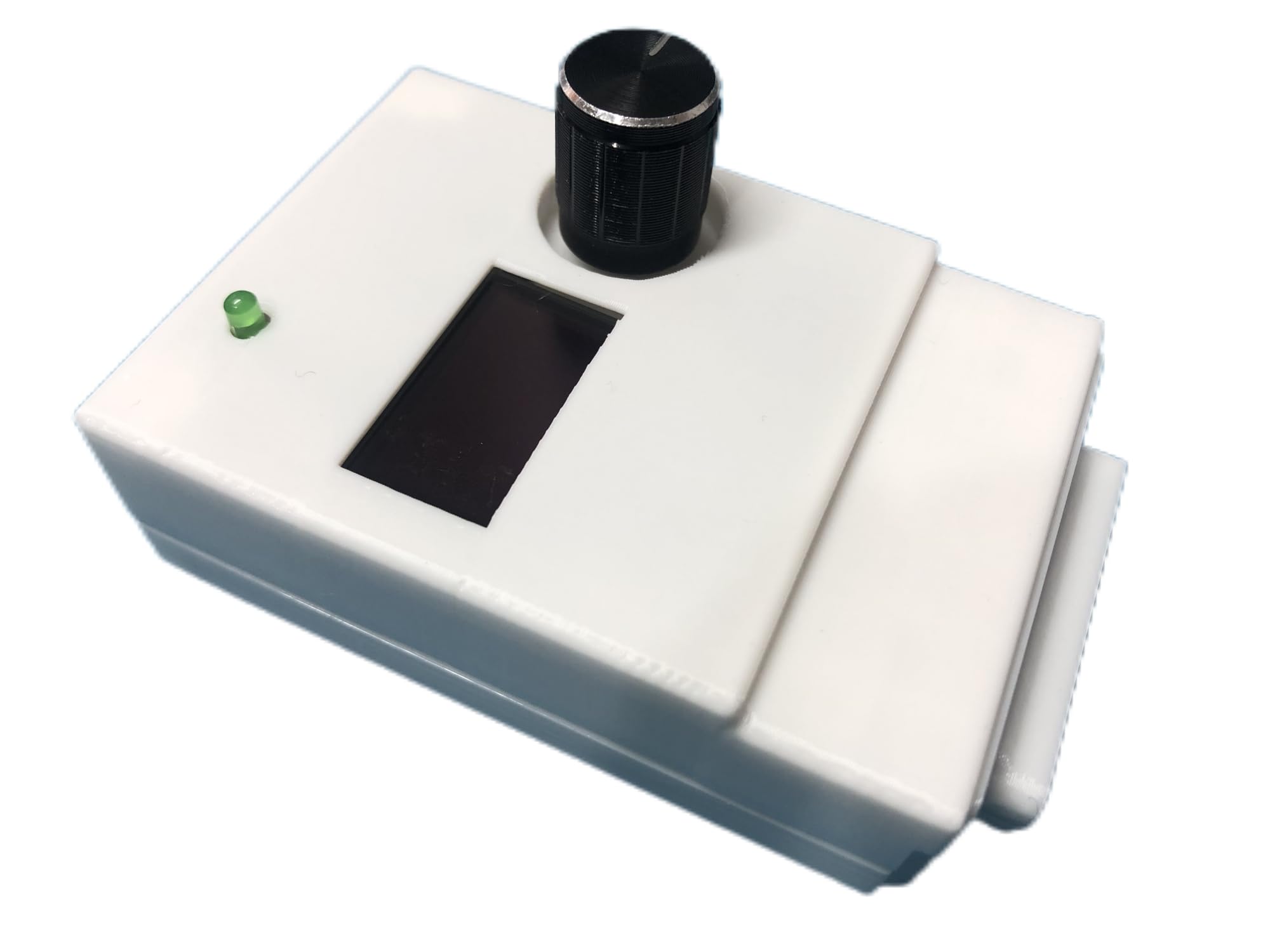
Description
- Very compact size - the width only 53 mm (will not interfere with other ports) - Weight - only 57g - Already flashed to Flashfloppy 3.41 firmware. - Connected directly to Disk Drive port (no additional cable required) - Powered directly from Disk Drive port (no additional power supply required) - comes with 3D printed case - OLED screen
Item Details
Seller

Nellis Auction
Pickup Location
4000 Meadows Ln
Las Vegas, NV, 89107
Quality
Estimated Retail Price
$37.50
Buyers Premium
15%
Inventory Number
1074134271
Additional Details from the Manufacturer
This item information is coming from the manufacturer. Some of the details may vary from the Nellis Auction listing. Please check the Quality Rating and Notes for information specific to this listing
brand
HoneyLanssize
2 x 3 x 1 inchesMore features
- Features: - Very compact size - the width only 53 mm (will not interfere with other ports) - Weight - only 57g - Already flashed to Flashfloppy 3.41 firmware. - Connected directly to Disk Drive port (no additional cable required) - Powered directly from Disk Drive port (no additional power supply required) - comes with 3D printed case - OLED screen
- All you need to do is connect your Mini External Gotek into your Amiga Disk Drive port, connect USB Pendrive (not included) with games and copy 2 necessary files (USB pendrive not included). You need to download this software: github.com/keirf/FlashFloppy/wiki/Downloads and copy 2 files from archive into the root of your USB pendrive: - HxC_Compat_Mode/Amiga/AUTOBOOT.HFE - HxC_Compat_Mode/HXCSDFE.CFG Then copy your *.adf games and programs anywhere in your USB Pen Drive.
- You can boot from your Gotek external connected to Disk Drive connector from your Amiga 500+, 600, 1200. Simply please click right and left button mouse same time and in boot menu choose DF1. You can also use this external Gotek on Amiga 500 but you will need a boot selector.
- Most Important: 1.The USB Pen Drive is NOT included. 2.The DF0/DF1 boot selector is necessary for Amiga 500. Some games or programs require to run on DF0. Amiga 500 can use the boot selector to solve this problem. We also provide Internal Gotek Floppy Drive Emulator as DF0.
See the deals
Get in on the action, thousands of new items added daily. Bid and win!
Start bidding now